The Job Loop: Office, Map, Clue, Shot, Report
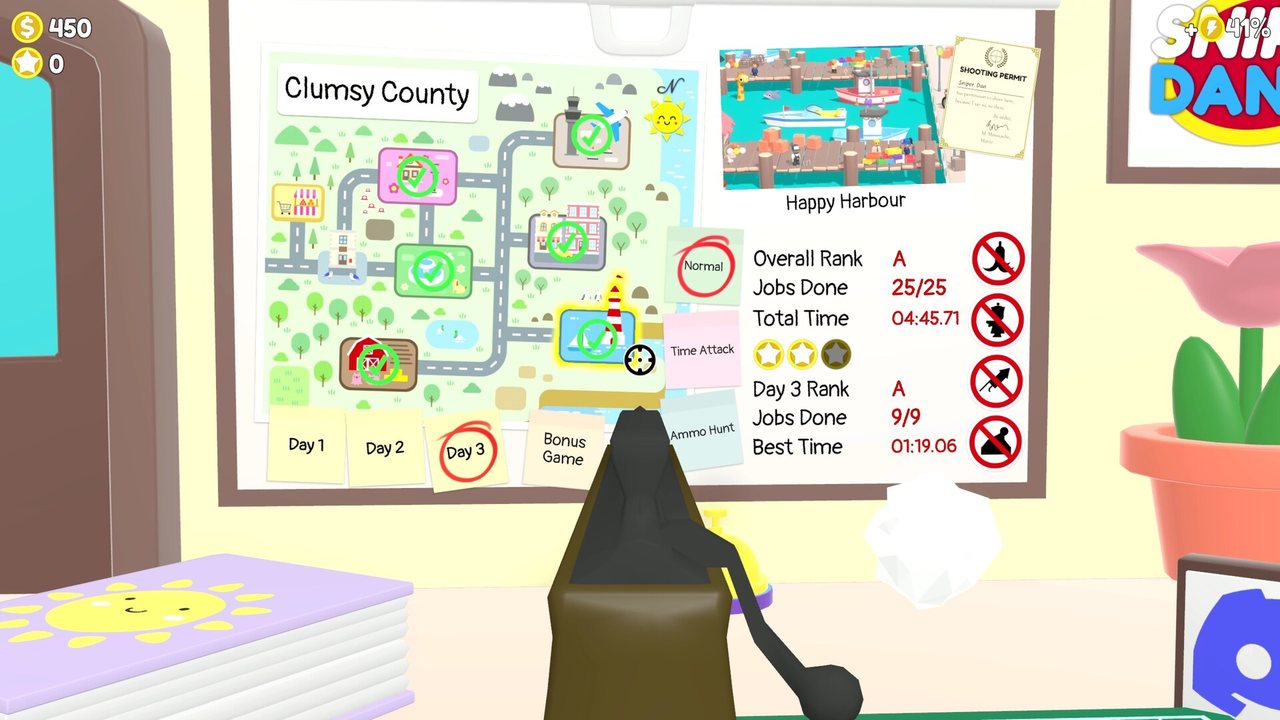
Sniper Dan is a hidden-object game searched through a rifle scope. The office is the hub: the tutorial has you shoot the cover hiding the wall map, zoom in with the mouse wheel and shoot the location you want to work. You start with a permit for Perky Park; other locations unlock once you have enough reputation to shoot their permit.
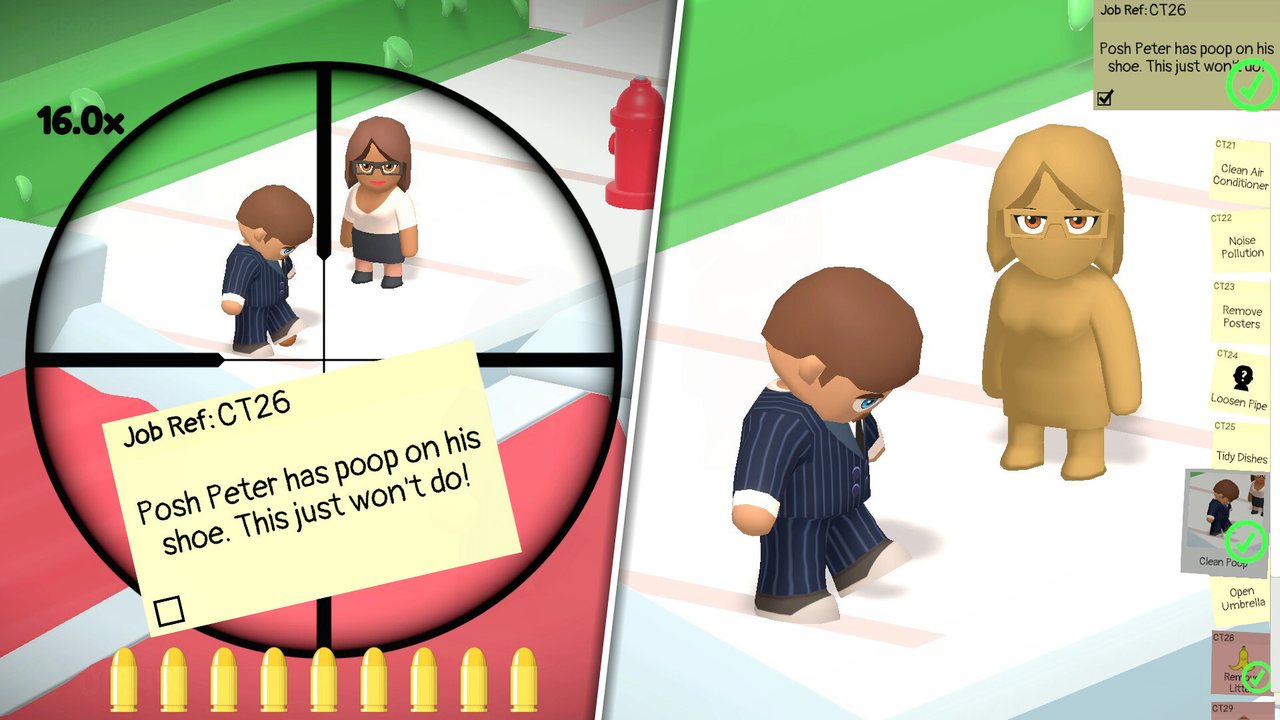
On site, everything you need is in the scoped view. The job list holds the wording of each task: the tutorial has you sift it with the right mouse button and the scroll wheel, and spend a hint on the selected job with the left mouse button. Picture clues are revealed by targeting part of a job in the location.
A location holds several jobs at once. The Perky Park set in the release-day footage is remove leaves, start fountain, push a peep, blow bubbles and take a selfie, and some need more than one shot: the leaves job was five separate piles. Finish the required work and the game reports the location complete.
- 01Shoot the covered map in your office to open the job map.
- 02Zoom with the mouse wheel and shoot the permit you want; Perky Park comes first.
- 03Shoot the doors to travel between a job site, Magic Market and your office.
- 04Open the job list, choose one task and read its clue and picture before you start scanning.
- 05Check the objective after each shot, and keep working until the game reports the location complete.
Watch the linked creator’s original gameplay. Use the current in-game clues if the setup differs.
Some solutions change between runs. Follow the current clue and the completion feedback instead of copying a frame from someone else's video.
Reading The Clue Instead Of The Crowd
The clue describes an object, not the person attached to it. Handy Hank has no idea how to turn on the fountain, so the answer is the pipe feeding it; a task about blowing bubbles is solved at whatever makes bubbles, not at the bystander complaining about dry lips.
Picture clues appear once you aim at part of a job in the location, confirming you are hunting the right family of objects. One recording describes the game circling the object once you are on it. Another player could not get that highlight to appear at all while hunting a specific beard, so treat the marker as help rather than a guarantee.
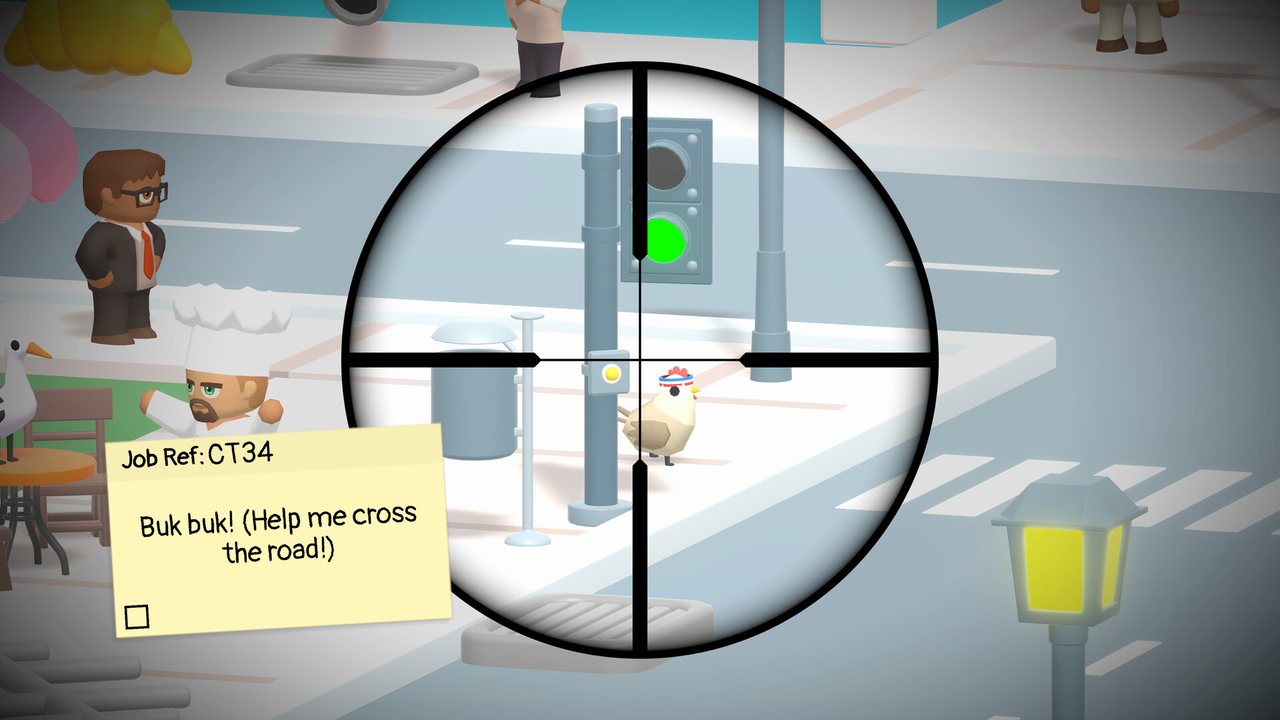
The two failure modes are opposites. Zoomed too far out you cannot see small props; zoomed too far in, the scope circle becomes the whole screen and you miss anything at the edges. One player put it plainly: they normally use the whole screen as peripheral vision, but the scope makes you stare inside the circle.
- Re-read the clue before each new sweep; 'raking leaves is so boring' names the object, not the character.
- Scan wide, then zoom in to confirm a candidate before firing.
- Watch the job list as you pan: a picture clue resolving means you are close.
- Count the parts. A job asking you to remove leaves wanted five piles in the footage.
- Some props are scenery and do not respond at all, so a shot that does nothing is information.
Cash, Reputation And The Three Starter Hints
Completing jobs earns cash and reputation, and they are not interchangeable. Cash pays for the goods in Magic Market: rifle upgrades such as faster shooting, quicker reloads, a larger magazine and extra zoom, plus office furniture. Reputation drives progress instead, because enough of it lets you zoom in on the map and shoot a new location permit.
Reputation is also the hint currency. The tutorial hands you three hints, one is redeemed on the selected job with the left mouse button, and more are bought by trading reputation at Magic Market. Using one costs you points as well as goods: two separate recordings mention the rank dropping after a hint.
Office items are the quiet third category. Many decorations add a small bonus to the cash you earn each time you complete a job, and the running total sits in a corner of the interface. Stock rotates and prices differ between recordings, so read the tags in your own game rather than budgeting from a video.
| Screen element | What it shows | What to do with it |
|---|---|---|
| Covered map in the office | The job map, with available and still-locked locations | Shoot it, zoom in, then shoot a permit you have earned |
| Job list | Text clue for every job, plus a picture clue once you aim at part of one | Pick a single job, read it fully, then start scanning |
| Hint tickets | How many hints you hold; the tutorial gives three | Spend only after re-reading the clue, because hints cost rank |
| Cash total | Money earned from completed jobs | Rifle upgrades first, furniture and decor afterwards |
| Reputation total | The progress currency | New location permits, and more hints at Magic Market |
| Work review | Hits, bad hits, hints used, jobs completed and failed, and time | Read it before you move on to see what cost you your rank |
Zoom, Reload And The Controls Worth Knowing
Zoom is your main tool. The tutorial says mouse wheel, one recording has it on the middle mouse button, and the settings menu includes a controls page, so check your own bindings if nothing happens. The rifle also has its own reload key, which matters because the bolt cycle makes a quick second shot impossible and the magazine is small.
Learn the reload behaviour before a crowded job. At least one player complained they could only reload after using up the magazine, and another wanted reload speed as their first purchase because the delay kept spoiling a run. If you are lining up several objects in one sweep, reload between them rather than discovering an empty rifle mid-hunt.
Cheap upgrades change the feel quickly. Extra zoom, a faster reload action and a larger magazine are the common early buys in the footage, and they pay for themselves before any decoration does.
One of those controls was fixed in Patch #1 (V43, September 24): your viewing direction no longer resets when you switch between the rifle and the camera, so you keep the aim you had lined up before the swap.
Zoom, reload and job-list keys all live on the settings screen, so it is worth a look before your first real shift.
Shooting A Person Or The Wrong Thing
The rule arrives with your sniper assessment: we do not shoot peeps or animals, we always aim to please. The game enforces it through your report rather than a fail state. Shots that land on a person or an animal count as bad hits, cost you money and drag the finish rank down; one player pinned a whole rank on a single bad hit.
Scenery is usually harmless. A recording of the office shows the player shooting a chicken and the ceiling with nothing happening. Some props are worth hitting anyway, because boxes can be destroyed and some of them hide coins, and a beach full of litter is a job in itself. That is what tempts players into spraying at everything.
That habit is what backfires. A player who fires continuously will eventually clip a person or an animal standing next to the prop they actually wanted. Aim at the clue's object, take the shot, and let the animation finish before moving on.
Before You Leave A Location
The location finishes once its required jobs are done, so the last check happens before your final shot. Note the litter, coins and other optional objects you have spotted but not shot: the reward for a strong shift usually arrives as a parcel you have to shoot open.
Then read the review properly. It reports hits, bad hits, hints used, jobs completed and jobs failed, and how you did against the clock; one player only discovered that the time limit existed at this screen. The rank it hands out needs a home for the trophy too: a plushy shelf or a fridge from Magic Market.
One caution from a real run: a creator ended a later location by accident before finishing the bonus work. If a collectable shelf still looks empty, sweep the scene once more first. Emergencies interrupt shifts too: a ringing phone you have to shoot, a big red arrow and a timed rush. Locations also run over several days, so a thin first visit is not the end of the map.
Check the optional counters before you land the last required shot, and answer the phone when new jobs or an emergency come through.
Hotfix #1 (September 19): Rank Display, A Crash And An Award Bug
The first post-launch hotfix landed on September 19 and touches three things you meet in the opening hours: the Work Board, the Job List and Time Attack awards.
Your Overall Rank on the Work Board is now calculated from the days you have actually completed, rather than counting every possible day. If your rank looked worse than your results deserved, that was the old formula — re-read the board after the update.
Two reported bugs are fixed. Pressing Back while navigating the Job List during the transition from normal play into a Boss or Bonus Job could crash the game, and a Time Attack award could throw an error if you did not own the Plushie Shelf.
The announcement lists no balance changes to jobs, targets or payouts, so the walkthroughs on this site still describe the current build. If a later patch changes a job's target, the in-game clue text wins over any page here.
| What changed | Before the patch | After the patch |
|---|---|---|
| Overall Rank on the Work Board | Calculated using every possible day, whether or not you played it | Calculated from the days you actually completed |
| Job List navigation | Pressing Back while the Job List moved from normal play into a Boss or Bonus Job could crash the game | Crash fixed |
| Time Attack awards | An error could appear when earning an award without owning the Plushie Shelf | Error fixed |
| Happy Harbour, Day 1 Peg Leg job | The Surprise Pirate stayed visible and could be shot by mistake | The Surprise Pirate is hidden while that job is active |
Patch wording comes from the developer's own announcement (September 19, 2026), not from a third-party patch list.
Patch #1 (September 24, V43): Controls, Emergencies And Two Job Fixes
Patch #1 went live on September 24 as version V43, a week after launch. It carries two fixes and six improvements, and it is the first update that retunes how the game feels rather than only repairing it.
The change you will meet every shift is the mode switch. Your viewing direction no longer resets when you move between the rifle and the camera, so a quick look through the camera no longer costs you the aim you had lined up.
Two Day 2 Emergencies were given more time: Central City and Aces Airport. Neither location has a walkthrough on this site yet, and the announcement puts no number on the extra time, so treat those emergencies as a little more forgiving rather than solved.
In the office, two long-standing annoyances are gone. The Jiangshi achievement now appears on the fridge after it unlocks, and the Remove Posters job no longer visually overlaps the Clean Dishes job, which used to make it too difficult to find. The Answerphone tutorial was tightened as well: after you activate the Answerphone, the pointing hand now aims at the open door instead of leaving you to work out the route.
The end-of-location fights were retuned too. The Funky Farm Boss is easier and more accurate following players who found that section frustrating, and the Aces Airport Boss lives went from three to five. No job targets, clue wording or payouts are listed as changed, so the walkthroughs on this site still describe the current build.
| What changed | Before the patch | After the patch |
|---|---|---|
| Rifle and camera modes | Your viewing direction reset every time you switched between the two | Your viewing direction is kept across the switch |
| Central City, Day 2 Emergency | The time allowed during the emergency | Increased, so there is more time to work out what needs to be done |
| Aces Airport, Day 2 Emergency | The time allowed during the emergency | Increased, on the same player feedback |
| Answerphone tutorial | The pointing hand did not lead you to the open door | The hand points at the open door after you activate the Answerphone |
| Funky Farm Boss | Players reported this section was frustrating at times | Easier and more accurate |
| Aces Airport Boss | 3 lives | 5 lives |
| Jiangshi achievement | It would not appear on the fridge after being unlocked | It appears on the fridge as expected |
| Remove Posters job | It could visually overlap the Clean Dishes job, making it too difficult to find | The two jobs no longer overlap |
Patch wording comes from the developer's own announcement (September 24, 2026, version V43), not from a third-party patch list.
Patch #2 (October 15): Bonus-Round Messaging, Camera Zoom And Airport Jobs
PC Patch #2 went live on Steam on October 15 — the second update of the run after V43 — with nine improvements and nine bug fixes. Most of the improvements are tutorials and messages for things the game already let you do, which is why several of them touch the controls and hint notes on this page.
Bonus Rounds take the loudest change. Rapid fire during them was always allowed, but players did not realise it, so the on-screen text now announces "Rapid Fire Activated" instead of leaving the option to be discovered. If a bonus round starts and you are still pacing yourself shot by shot, watch for that message and let the rifle run.
Fine zoom picks up a tutorial. Controller players are shown a new lesson the first time they enter a level after buying the camera, explaining that the right analogue stick gives finer zoom control. Nothing moves for mouse players: the wheel and the settings bindings stay exactly as the Zoom section above describes them.
Two Aces Airport jobs in its Day 3 are in the patch as well, and neither location has a page on this site yet. The Boss now puts semi-transparent covers over its conveyor belts, because players were shooting the luggage before it had passed through the detectors; the Spilt Oil job's reveal area was narrowed to the hangar doors themselves rather than the hangar around them.
The rest of Patch #2 splits across other pages here: the Magic Market's hints tutorial and the mini-game repairs are covered on the market guide, Happy Harbour's Day 2 and Day 3 fixes have their own section on the harbour walkthrough, and Vibrant Village and Funky Farm each take a single fix. No job targets or payouts are listed as changed, so the walkthroughs on this site still describe the current build.
| What changed | Before the patch | After the patch |
|---|---|---|
| Bonus Rounds | Rapid fire during Bonus Rounds worked, but the screen never spelled it out | A "Rapid Fire Activated" message appears during a Bonus Round |
| Fine zoom, controller | Only the basic zoom controls were taught, without a dedicated camera lesson | Entering a level for the first time after buying the camera triggers a tutorial on right-stick fine zoom |
| Aces Airport, Day 3 Boss | Luggage could be shot before it passed through the detectors | Semi-transparent conveyor covers prevent early shots and make the intended order clearer |
| Aces Airport, Day 3 Spilt Oil | The reveal area covered the surrounding hangar | The reveal area is the hangar doors themselves |
Patch wording comes from the developer's own announcement (October 15, 2026), not from a third-party patch list.
Further viewing and references
For precise targets, compare your own current mission against the source footage. Older demo material and screenshots may differ from the full release.